Amazon made an interesting announcement recently. The company shared Amazon Quick, a desktop AI assistant that "lives on your computer and connects directly to your work." The desktop app, built on top of Amazon's existing web and mobile Quick experience, adds something the web version fundamentally can't: access to local files, local email threads, local compute resources.
As analyst Bob O'Donnell noted in Seeking Alpha, Quick "validates the role of client devices in agentic AI by handling pre-processing, orchestration, and indexing locally on the device. Quick's model inference still runs in AWS, but the agent runtime, knowledge graph, and file indexing operate locally — which is exactly the architectural pattern that makes endpoint management non-negotiable
Amazon isn't alone in this. Microsoft's Copilot is built the same way. So is Anthropic's Claude Cowork. Every major AI player has reached the same conclusion: agentic AI, the kind that actually does work, not just answers questions, needs to run close to where work happens. That means the desktop. That means the endpoint.
Here's what nobody in those announcements mentioned: most enterprise endpoints weren't built for this.
Agentic AI Is Different From What You've Been Managing
It's worth being precise about what "agentic AI" actually means, because the term is getting used loosely.
A traditional AI tool, a chatbot, a summarization tool, a content generator, responds to prompts. You ask, it answers. The interaction starts and ends with you.
An agentic AI system is different. According to Gartner, by end of 2026, 40% of enterprise applications will feature task-specific AI agents, up from under 5% in 2025. These agents don't wait to be asked. They monitor, reason, plan, and take action, autonomously, across applications and data sources. They can draft an email, update a compliance record, flag a policy violation, and schedule a follow-up without anyone pressing a button.
That's a fundamentally different relationship between AI and the device it runs on. And it introduces a fundamentally different set of requirements.
When an AI agent is operating on a device, it needs:
- Consistent access to local data, applications, and compute - without interruption
- Governed permissions that determine what it can and can't do, and to what data
- An audit trail that satisfies your compliance requirements when it takes action
- A managed environment where IT can see it, control it, and update it
In short: it needs a well-managed endpoint. And in regulated industries, healthcare, financial services, education, and government, those requirements aren't optional: they're the baseline for deployment.
Microsoft Just Made Intune the Control Plane for AI Agents
This is the part that changed on May 1, 2026 and it's significant.
Microsoft announced the general availability of Agent 365 on May 1, 2026. At a high level, Agent 365 is a governance platform for enterprise AI agents, a centralized system for discovering, monitoring, and controlling which agents are running in your organization and what they're allowed to do.
Here's the part that matters for endpoint management teams: Agent 365 uses Microsoft Intune to enforce its policies.
From the Microsoft announcement published:
"IT professionals can apply Intune policies to continuously detect managed devices and block the common methods of running [AI agents] on them."
Starting in June 2026, organizations will be able to use Intune to discover which AI agents are running on which devices, apply policy-based controls on what those agents can do, and block agents that aren't sanctioned. The controls are launching with support for OpenClaw agents and expanding to GitHub Copilot CLI, Claude Code, and others shortly after.
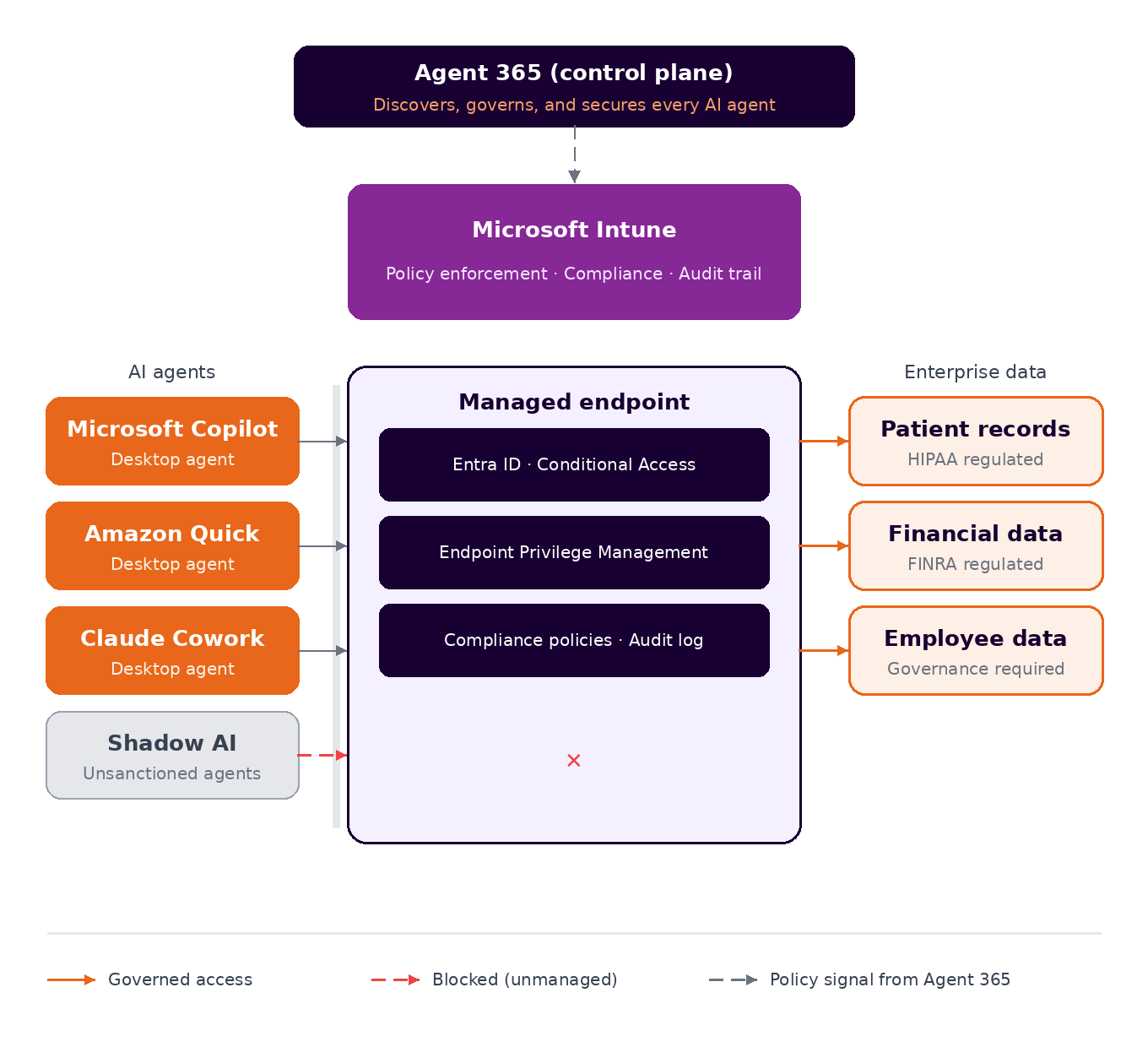
If your devices aren't enrolled in Intune, or if your Intune environment is enrolled but misconfigured, missing Entra ID integration, or not running Endpoint Privilege Management, you don't have a gate. You have AI agents running unchecked on devices you can't fully see, with permissions your compliance team hasn't reviewed, on a network your auditors are going to ask about.
This is not a future risk. This is the environment as of June 2026.
The Gap Most AI Strategies Are Missing
There's a pattern playing out in organizations right now that's worth naming directly.
Leadership approves an AI initiative. A vendor is selected, pilot is designed, and the technology team is brought in to "enable it." And somewhere in that process, the assumption gets made (rarely stated, almost never validated) that the endpoint environment is ready for what's about to land on it.
Microsoft and The Health Management Academy published research in January 2026 showing that in healthcare specifically, 43% of organizations are piloting or testing agentic AI but only 3% have deployed agents in live workflows. The gap between experimenting and operational is real, and it's not primarily a technology problem. It's an infrastructure readiness problem.
And the endpoint environment is only one piece of that readiness picture.
What "Endpoint Readiness for Agentic AI" Actually Means
For an organization in a regulated industry, endpoint readiness for agentic AI means being able to answer these questions:
AI Agent Visibility
- Can you see every device that will have an AI agent on it?
- Do you have real-time telemetry on device health, compliance state, and software inventory?
- Can you identify, right now, which devices in your environment are running unsanctioned AI tools?
- Are your Conditional Access policies configured to enforce device compliance before granting access to sensitive data that an AI agent might reach?
- Do you have Endpoint Privilege Management in place to control what an AI agent can do when it needs elevated permissions?
- Is your Entra ID integration set up so that identity and device context are both factors in access decisions?
- Can you produce an audit trail of what an AI agent did on a managed device, and when, if a regulator asks?
- Are your HIPAA, FINRA, or FERPA controls accounting for the possibility of an AI agent accessing patient or financial records?
- Do you have a process for reviewing and approving new AI agents before they're deployed to your fleet?
AI Agent Governance
- Are your Conditional Access policies configured to enforce device compliance before granting access to sensitive data that an AI agent might reach?
- Do you have Endpoint Privilege Management in place to control what an AI agent can do when it needs elevated permissions?
- Is your Entra ID integration set up so that identity and device context are both factors in access decisions?
AI Agent Compliance
- Can you produce an audit trail of what an AI agent did on a managed device, and when, if a regulator asks?
- Are your HIPAA, FINRA, or FERPA controls accounting for the possibility of an AI agent accessing patient or financial records?
- Do you have a process for reviewing and approving new AI agents before they're deployed to your fleet?
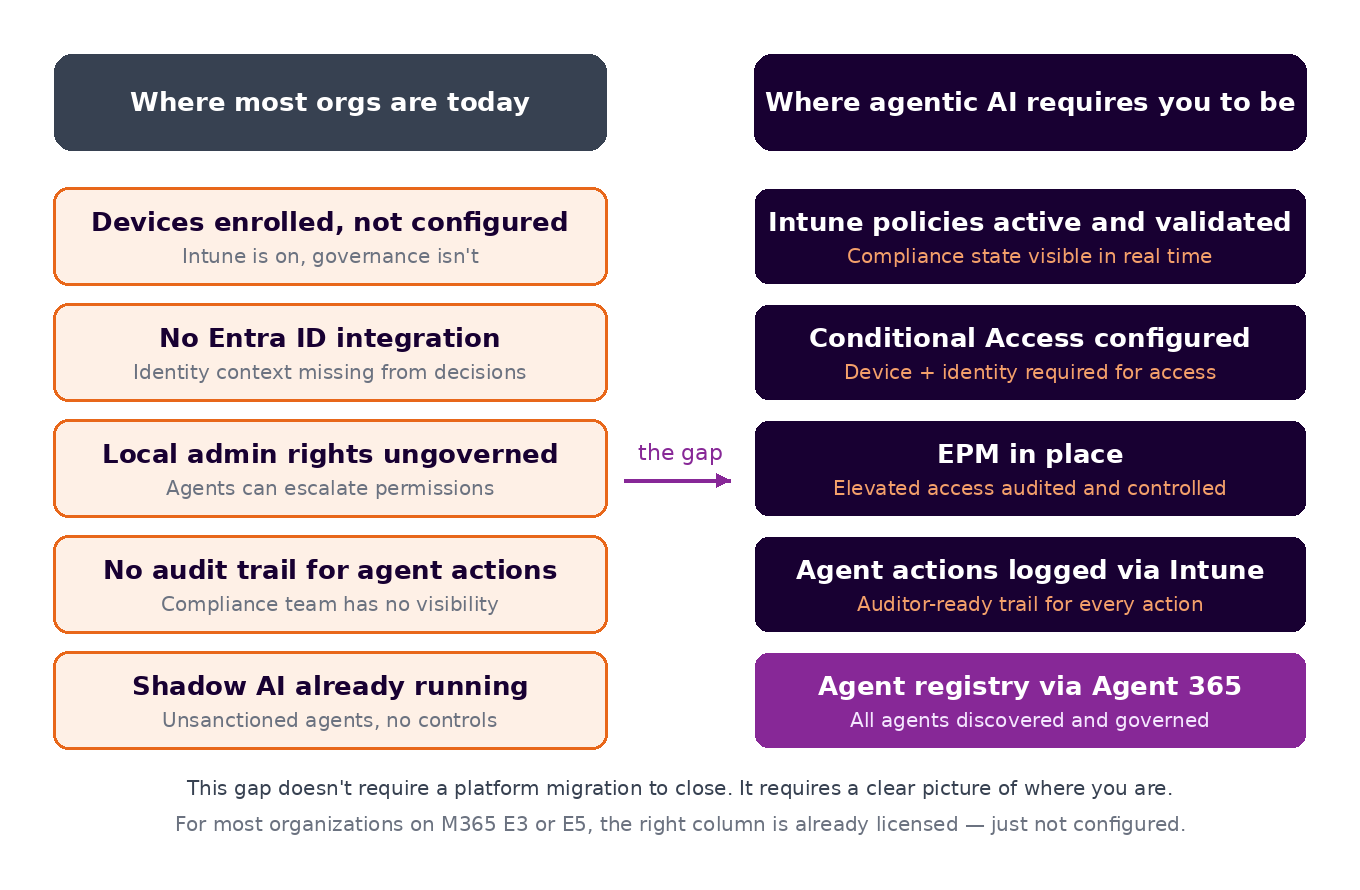
If the honest answer to most of those is "not yet," that's the gap. And it's a gap that needs to be closed before the AI initiative, not after it stalls.
The Intune Timing Is Not a Coincidence
Microsoft's July 2026 licensing changes, which expand Intune capabilities across M365 E3 and E5 (with the deepest controls landing in E5), aren't arriving in isolation. They're arriving at the same moment that:
- Agentic AI tools from Amazon, Microsoft, Anthropic, and others are moving from cloud-only to desktop-native
- Microsoft is using Intune as the enforcement layer for AI agent governance via Agent 365
- Compliance frameworks in healthcare, financial services, and government are tightening their expectations around endpoint governance and audit trails
The licensing change shifts the cost equation for Intune capabilities. E3 and E5 both increase by $3 per user per month, but the value of what's bundled depends heavily on which tier you're on. E5 absorbs the bulk of it, including Endpoint Privilege Management, Enterprise App Management, Cloud PKI, and Security Copilot allocation. These capabilities previously required separate add-ons totaling roughly $11 to $12 per user per month. E3 gets a more modest set of additions. For organizations already paying for those add-ons, the new pricing is effectively a discount. For everyone else, it's a modest increase bundled with capabilities you didn't ask for but probably need.
Security Copilot agents in Intune,, which can autonomously handle policy creation, vulnerability remediation, and device offboarding, are now available to E5 customers. E3 customers get a narrower slice. The advanced controls the article points to as readiness requirements, Endpoint Privilege Management chief among them, sit in E5 or remain a separate purchase. The capability is there. The question is whether the underlying environment is configured to use it safely.
For organizations on SCCM, Jamf, ManageEngine, or another platform, the question is whether the migration conversation has been approached with enough seriousness. Not because Intune is always the right answer, it isn't, (and a Jamf co-management scenario is better for Mac-heavy environments) but because the endpoint management layer is where AI governance is going to live, and the environment needs to be ready for that role.
The Practical First Step
If your organization is anywhere on the spectrum from "we're exploring Copilot" to "we just launched an AI agent initiative," the most useful thing you can do right now is get a clear picture of your current endpoint environment. Not a migration plan and not a platform decision, a diagnostic.
What devices do you actually have? Which are enrolled, which aren't, and which are enrolled but misconfigured? What Intune capabilities are available in your current license that you haven't turned on? What's the gap between where your endpoint environment is and where it needs to be for AI governance to work?
Those answers shape every decision that comes after — including whether a migration makes sense, which AI tools are safe to deploy to which users, and what you need to tell your CISO, your compliance team, and your auditors when they ask.

-1.png?width=2240&height=1260&name=Anunta%20Blog%20Banner%20(1)-1.png)

.png?width=7000&height=3938&name=Anunta%20Blog%20Banner%20(7).png)