Moving a few hundred virtual desktops is a project one person can hold in their head. Moving eight thousand desktops across multiple geographies, application dependencies, and compliance regimes is a program, and the techniques that work at the smaller size stop working somewhere in between.
At three hundred users, a team can survey everyone about their peripherals. At eight thousand users, surveying everyone is not practical, so discovery tooling must find what a survey would miss. At three hundred users, a single golden image and Virtual Machine type serves the population acceptably. At eight thousand users, one VM size produces a group with too little capacity and a group with too much: the first files tickets, the second quietly inflates the bill.
Migration is on the docket for many organizations because the market pressure has been building over the last few years. Broadcom's licensing changes have moved VMware renewal conversations from routine to strategic, and a large share of the migration evaluations I see now start with a renewal quote rather than with a performance complaint. Those evaluations rarely produce fast moves. Unwinding a decade of accumulated process dependencies takes far longer than the licensing decision that triggered the review, and planning for a multi-quarter program rather than a single project is the more realistic posture.
What Counts as a Large-Scale VDI or DaaS Migration?
At Anunta, a large-scale VDI migration moves more than a thousand users from one virtual desktop platform to another. This category covers on-premises VDI moving to cloud-hosted DaaS, platform changes between vendors, and hybrid configurations spanning both models.
Complexity rather than headcount defines the category. At this scale a team manages multiple user personas, dozens of applications with varying compatibility profiles, and infrastructure dependencies that stay hidden until something moves. User count works as a proxy for how many ways the environment can produce a surprise.
What Is the Difference Between VDI and DaaS for Enterprise Migrations?
VDI runs on infrastructure your organization controls, and DaaS shifts that infrastructure to a cloud provider on a subscription basis. The distinction matters more for the years after go-live than for the migration itself.
Under VDI, your team owns capacity planning, patching cadence, and the hardware refresh cycle. Under DaaS, your organization trades that control for a consumption model and a shorter list of components your team maintains directly. Neither model is inherently better. The right answer depends on your compliance posture, your existing staffing, and whether your desktop estate is stable enough to reward control you are paying to exercise.
DaaS migrations also change the operating model in ways that surface later. Cost moves from capital to operating expense. The performance envelope becomes dependent on a provider's regional footprint. Questions about who monitors, patches, and tunes the environment grow more consequential, because the answer is no longer automatically your team.
How Do You Assess Your Current VDI Environment Before Migration?
Assessment determines the outcome of every phase that follows, which is why assessment deserves more calendar time than most plans allocate. Organizations that compress this phase encounter more surprises mid-migration, and those surprises convert directly into schedule slip, budget overrun, and user disruption.
Infrastructure Discovery and Dependency Mapping
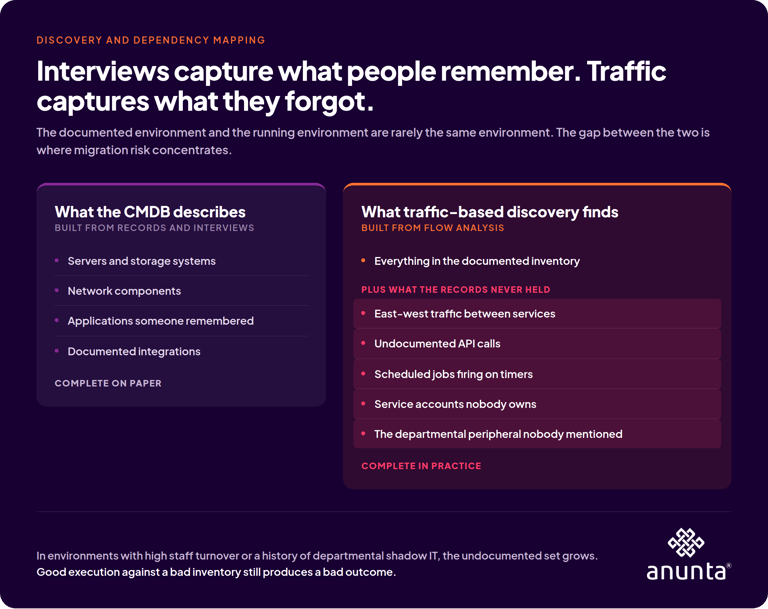 Start with what the environment contains rather than what the documentation claims. Infrastructure discovery catalogs every server, storage system, and network component touching the virtual desktop estate, and the resulting catalog rarely matches the CMDB.
Dependency mapping goes further and matters more. Which applications require specific hardware configurations? Which user groups depend on peripherals that may not redirect properly in the target environment? What integrations connect the desktop estate to backend systems, and who owns the service accounts holding those integrations together? That final question tends to produce silence, because service accounts get created by engineers who have since left and nobody wants to be the person who disables one to find out what breaks.
Use traffic-based discovery rather than interviews alone. Interviews capture what people remember, and flow analysis captures what people forgot. In an environment with high staff turnover or a history of departmental shadow IT, the gap between memory and traffic is where migration risk concentrates.
Performance Baselining
Capture logon duration, application launch times, session responsiveness, and resource utilization across the current environment before anything moves. Baselining serves two purposes, and the second purpose matters more than most teams expect.
The first purpose is target setting, since designing toward a performance goal requires knowing the starting point. The second purpose is evidence. When a stakeholder asks three months after cutover whether the migration improved anything, baseline data supports an answer built on measurements. Without baseline data, the conversation becomes an argument about whether the environment feels faster, and that argument has no resolution.
What Are the Most Common Reasons Enterprise VDI Migrations Fail?
The most common failure patterns are compressed assessment, underestimated application dependencies, insufficient user readiness, and treating migration as a purely technical exercise. All four are planning failures rather than execution failures.
The pattern I see most often is a team doing competent technical work against an incomplete picture. The architecture was sound for the environment the team had documented, and the documented environment was missing forty applications and a departmental peripheral nobody mentioned. Good execution against a bad inventory still produces a bad outcome.
How Do You Define User Personas for Migration Planning?
Persona definition matches resource allocation to observed work patterns, which prevents both over-provisioning and performance bottlenecks. The alternative is a single generic configuration that serves the average user adequately and everyone else poorly.
Categorizing User Workloads
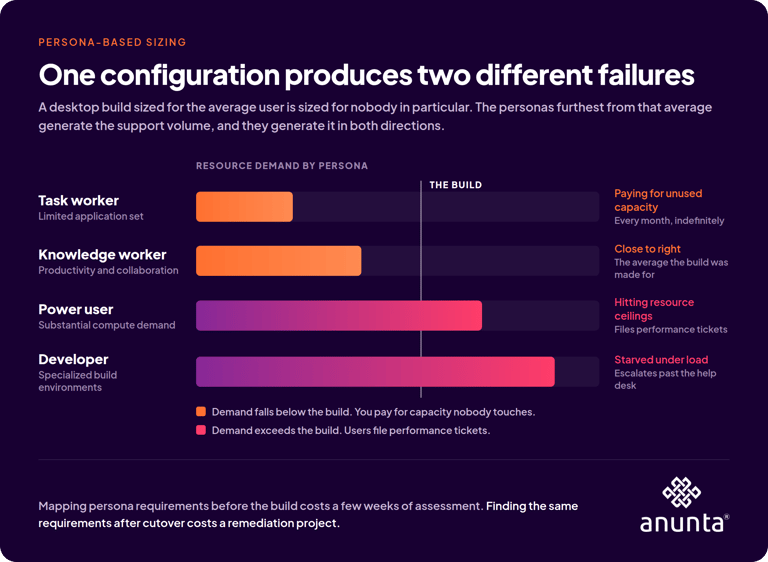
Common categories include task workers running a limited application set, knowledge workers needing productivity and collaboration tools, power users requiring substantial compute, and developers needing specialized environments with elevated permissions. Each category carries distinct requirements for CPU, memory, storage, and application access.
A configuration built around the average user is built around nobody in particular. The personas sitting furthest from that average generate the support volume, and they generate volume in both directions. Power users hit resource ceilings and file performance tickets. Task workers sit on capacity they never touch, and your organization pays for the unused capacity every month.
Mapping persona requirements before building the target environment costs a few weeks of assessment. Discovering the same requirements after cutover costs for a remediation project.
Geographic and Compliance Considerations
Users in different regions face different latency constraints and different regulatory requirements. Data residency rules constrain where virtual desktops can be hosted, and frameworks including HIPAA, SOC 2, and ISO 27001 impose specific controls on how session data is stored and accessed.
Build residency and regulatory constraints into the persona definitions rather than treating compliance as a parallel workstream. A persona that cannot legally exist in your chosen region is a design problem and catching a design problem during design costs far less than catching the same problem during audit.
What Does Application Readiness Mean for VDI Migration?
Application readiness means every application in the portfolio has been tested in the target environment before anyone commits to a migration date. Applications are where enterprise VDI migrations most frequently encounter unexpected complexity, and application testing is the phase most likely to become the critical path.
Compatibility Assessment
Every application needs evaluation, and the results sort into three groups. Some applications migrate directly with no intervention. Others require reconfiguration around licensing, drivers, or dependencies. A smaller subset proves incompatible with the target platform and needs either replacement or a decision to leave the application where it currently runs.
Assessment means testing in the target environment rather than reasoning about the target environment. Verify licensing compatibility, since license servers bound to specific hardware or network segments are a recurring source of late surprises. Check driver dependencies, particularly for anything touching specialized hardware. Validate performance under expected concurrent load rather than under single-user conditions, because an application that behaves well for one tester can behave differently when four hundred sessions launch the same application at 8:15 on a Monday.
Application Layering and Packaging
Layering separates the operating system from the applications, which allows each layer to be updated independently. The approach simplifies management substantially at scale, and the approach requires real upfront work to package applications correctly.
For an organization running dozens of applications across thousands of users, proper packaging pays back across the full lifecycle rather than only during the migration. Every subsequent update, patch, and new application deployment inherits the benefit. Packaging looks expensive when measured against the migration alone and looks obvious when measured against the three years following it.
How Should You Size Infrastructure for a Large Migration?
Size infrastructure from measured usage data rather than from vendor calculators, because a calculator assumes a workload profile that may not resemble yours. Under sizing produces performance complaints from the first day. Oversizing wastes budget and creates a cost structure that resists correction later.
Capacity Planning Based on Measured Usage
Use the baseline data from your assessment phase to drive sizing decisions. Peak patterns matter far more than averages. If your environment experiences a logon storm between 8:00 and 8:30 every weekday morning, the infrastructure has to absorb that spike without degrading session performance, and an average-based model erases the spike entirely.
Persona-based sizing produces better results than uniform allocation because capacity matches observed demand rather than a blended estimate. The work is unglamorous, and the work is the difference between an environment that performs and an environment that generates tickets.
Cloud Cost Modeling
For DaaS migrations, sizing decisions determine monthly cost directly. Pricing models vary meaningfully between providers and service tiers, and a configuration that looks efficient at five hundred users may not scale linearly to five thousand.
Right-sizing after migration deserves a explicit budget. Flexera's 2026 State of the Cloud Report surveyed 753 cloud decision-makers, who estimated that 29 percent of their IaaS and PaaS spend delivers no useful value, reversing five consecutive years of improvement. The 29 percent figure is self-reported, which makes the number a measure of practitioner judgment rather than an audited finding. The figure still points at something valuable, which is that provisioning decisions made during a migration tend to persist unexamined unless someone owns revisiting them.
What Security Controls Belong in Migration Planning?
Security controls belong in the design inputs, because retrofitting controls into a running desktop estate means disrupting the users you just finished migrating. Organizations that defer security to a post-migration phase consistently pay more and disrupt more than organizations that build controls from the start.
Identity and Access Management
The target environment needs integrated identity controls from the beginning, including Active Directory or Microsoft Entra ID integration, multi-factor authentication, single sign-on, and conditional access policies governing who reaches which resources under what conditions.
The migration itself creates identity complications worth explicit planning. Users need access to both environments during transition, which temporarily doubles the access surface. Service accounts often require reconfiguration, and the unowned service accounts require investigation before reconfiguration. Cleanup of legacy access after migration completes is a step many organizations defer indefinitely, and deferred access cleanup is how a completed migration becomes an audit finding.
Zero Trust Considerations
Zero Trust assumes no implicit trust based on network location, so every access request is verified and every session is monitored. The model suits DaaS environments particularly well, since users connect from arbitrary networks on devices your organization may not manage.
Building Zero Trust controls into the migration plan produces a target environment matching current security expectations. Deferring those controls produces a target environment replicating the perimeter assumptions of the infrastructure you are leaving.
How Do You Sequence a Large-Scale Cutover?
Sequencing determines which users move when, in what order, and with what provision for reversal. Poor sequencing disrupts business operations. Good sequencing limits the impact of problems and validates each phase before the following phase commits more users.
Phased Migration Waves
Enterprise migrations move in waves rather than all at once. Each wave validates performance and surfaces issues before the next wave adds users, which keeps the blast radius small when something breaks.
Wave sequencing weighs several factors: business criticality of each user group, complexity of their application requirements, geographic distribution, and tolerance for change windows. IT power users typically go first, partly because they troubleshoot independently and mostly because they produce specific technical feedback rather than a ticket saying the desktop is slow.
Treat each wave as a discovery mechanism rather than only as risk containment. Every wave reveals something the assessment missed, and sequencing waves around what your team most needs to learn early shortens the whole program.
How Long Does a Large-Scale VDI Migration Take?
A focused migration covering one to two thousand users typically runs eight to twelve weeks from scoping through go-live. Migrations spanning multiple geographies and compliance regimes extend to six to twelve months. Both ranges assume a thorough assessment phase.
The quality of upfront planning is the most reliable predictor of whether a timeline holds. Projects that compress assessment to protect a date rarely protect the date, because the skipped work does not disappear. The work relocates to the least convenient point in the schedule.
Rollback Planning
Every migration plan needs a rollback plan, and every rollback plan needs quantitative triggers defined before cutover starts. Specify the error rate, logon duration, or failed session count that initiates a reversal, and name the person authorized to invoke one.
Defining those triggers in advance matters because judgment degrades under incident conditions. Uptime Institute's 2025 Annual Outage Analysis found that close to 40 percent of organizations experienced a major outage caused by human error in the preceding three years, and that 85 percent of those incidents traced to staff failing to follow procedures or to flaws in the procedures themselves. A rollback decision made mid-incident without agreed thresholds falls into that second category, since the procedure that should have guided the decision was never written.
Test the rollback before your team needs one. Discovering that a reversal process does not work during an actual failure is a bad afternoon that was entirely preventable.
Why Does Day 2 Ownership Determine Long-Term Success?
Day 2 ownership determines long-term success because deploying an environment and operating one are different disciplines requiring different capacity. The pattern repeats with consistency. The organization goes live, the project team disperses, and twelve to eighteen months later the environment has become an operational drag nobody planned for.
The Gap Between Deployment and Operations
Deployment is a project with an end date and a defined scope. Operations is a continuing commitment covering monitoring, patching, performance tuning, and user experience management, with no end date at all.
Many organizations assume internal IT will absorb these responsibilities after go-live. That assumption underestimates both the specialized expertise required and the capacity those teams have already committed elsewhere.
What follows is erosion rather than failure. No single unpatched host or untuned image degrades an environment; in the same way no single rainfall moves a hillside. Configuration drift that accumulates in increments too small to trigger an alert, and the environment stays nominally healthy right until logon times cross the threshold where users start filing tickets. By that point, the drift has a fourteen-month head start.
What Should Day 2 Operations Include?
Day 2 operations should include proactive monitoring with real-time telemetry, patch management on defined schedules, performance tuning targeting logon times and session responsiveness, capacity planning that stays ahead of resource constraints, and user experience scoring that measures what users encounter rather than what infrastructure dashboards report.
That final item carries more weight than it appears to. Infrastructure health and user experience are related without being equivalent, and an environment can show healthy CPU and memory graphs while users wait ninety seconds to log on. Measuring the session rather than the host closes that gap, and session-level measurement is the instrumentation most environments lack.
How Do You Reduce User Disruption During Migration?
Reduce disruption by treating user experience as a design constraint rather than a communications problem. The objective is not simply moving users. The objective is moving users without degrading their ability to work.
Communication and Training
Users need to know what is changing, when the change arrives, and what they should do differently. Communication should begin well before the first wave and continue through the stabilization period rather than stopping at go-live.
Training requirements scale with how different the target environment feels to the person using it. A migration changing only backend infrastructure may need almost no training. A migration changing application access methods or workflow patterns needs substantially more, and underestimating training is a common way to turn a technically successful migration into a perceived failure.
Pilot Programs and Feedback Loops
Pilot groups validate the target environment under real conditions before broad rollout, and pilot groups should include users with genuinely diverse workload profiles rather than only the technically comfortable. A pilot composed entirely of IT staff validates that the environment works for IT staff.
Pilot feedback is where a team finds the signature pad that does not redirect, the application that behaves differently under load, and the workflow that breaks in a way nobody anticipated. Every one of those discoveries is cheaper during a pilot than during wave three.
What Should You Look for in a Migration Partner?
Look for a partner whose methodology covers assessment and post-migration operations rather than execution alone. The managed services market includes providers who specialize in deployment and leave, providers who operate environments without migration depth, and a smaller number who do both well.
Migration Experience and Methodology
Ask about the number and scale of migrations completed, and request references from organizations with comparable complexity. Look for a structured methodology that names its assessment and stabilization phases rather than treating both as implied.
The most useful question I know is this one: "walk me through a migration that did not go according to plan, describe what broke, and explain what the rollback looked like in practice." Partners who have only ever presented clean case studies struggle with that question, and partners who answer it well reveal something real about how they operate under pressure.
Day 2 Operational Capability
Confirm specifically what a partner does after go-live, at what service level, with what EUC-specific expertise, and under what SLA. A partner covering both migration and operations removes the handoff risk where institutional knowledge leaves the building between project phases.
Not to toot our own horn, but Anunta operates in that combined model, and the operational measures we hold ourselves to include customer satisfaction above 86 percent and platform uptime of 99.98 percent. Both numbers describe steady-state operation rather than migration execution, which is the point worth making.
How Do You Build the Business Case for Migration?
Build the business case around operating cost and risk rather than around purchase price, because purchase price is usually the least consequential number in the analysis.
A thorough total cost of ownership analysis covers infrastructure, licensing, operational labor, and the opportunity cost of the current state. The analysis should also account for the cost of downtime, the cost of a compliance failure, and the cost of migrating off a platform that turns out not to fit. That last item gets omitted almost universally, and pricing it explicitly is worth the effort. A platform that is inexpensive to adopt and expensive to leave has deferred a cost rather than eliminated one.
Legacy VDI environments also carry risks that never appear on a balance sheet. Aging infrastructure, unsupported software versions, and accumulated configuration drift each raise the probability of an incident affecting business operations. Quantifying those three risks makes them visible to stakeholders who would otherwise weigh only the upfront cost of the migration, and an unquantified risk loses every budget argument against a quantified expense.
Planning That Translates to Operational Stability
The question worth answering is not which platform costs least. The question is which approach leaves your organization with an environment that performs, stays compliant, and has not become an operational burden eighteen months after go-live.
Reaching that outcome takes real investment in assessment, persona-based planning, application readiness, and a clear answer about who owns the environment once the project team disperses. Organizations treating migration as a purely technical project encounter problems that organizations with structured planning avoid entirely.
The technology choices matter, and the technology choices are not what determines the outcome. Planning depth, execution quality, and clear operational ownership separate a migration that becomes a foundation from a migration that becomes technical debt. Decide who owns the environment before deciding what to run it on.



.png?width=7000&height=3938&name=Anunta%20Blog%20Banner%20(7).png)